
Understand passwords and cloud storage – step by step
Having a reliable digital safety guide is essential to protect your personal information online. This practical security pack is designed to help you protect your digital life and manage your data with confidence.
This pack includes two essential step by step tutorials focused on safety and modern storage:
How to Create a Strong Password (8 pages): Master the foundation of online security. This guide covers how to choose a truly strong password, reliable methods to remember them safely, and how to monitor your accounts to stay protected.
How to Get Started with Cloud Storage (9 pages): Demystify the Cloud. You will learn exactly what cloud storage is, why it is beneficial for your daily use, and how to start using it to keep your important files accessible and secure.
For improved reading comfort, each guide uses a large 14 point font. The tutorials are provided in PDF format, optimized for printing on 8.5 × 11 Letter paper, with margins designed for easy binding without cutting off any content.
Secure checkout powered by Gumroad
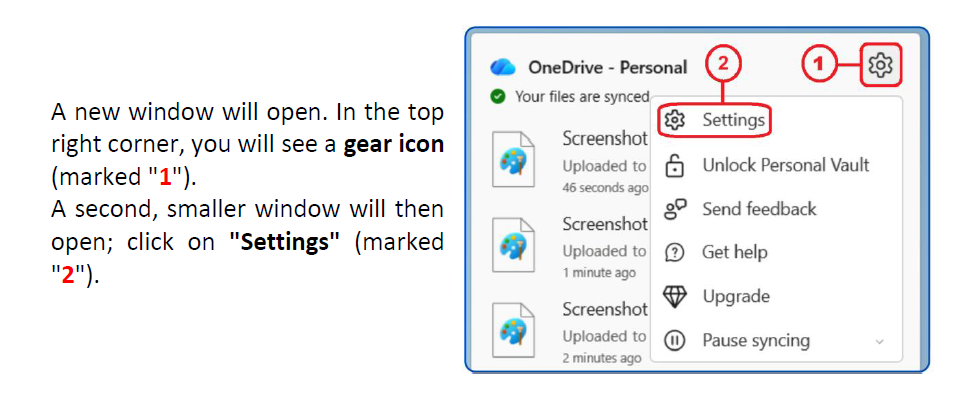
For every action, users are guided by a precise screenshot that matches exactly what they see on their own screen. Each click is explained step by step, ensuring that even complete beginners can follow along easily. This approach removes hesitation and allows you to progress at your own pace.
Here are the two tutorials that make up this Digital Safety theme:
How to Create a Strong Password
Step 1: Choosing a strong password
Step 2: How to remember your passwords safely
Method A:The first-letter technique (Acronyms)
Method B:Passwords saved in your web browser
Method C:The digital vault (Password managers)
Step 3: Monitoring your passwords
A. quick and free check-up
B. “All-in-one” security suites
Summary
How to Get Started with Cloud Storage
Step 1: What Is Cloud Storage?
Step 2: Why Use Cloud Storage?
Step 3: Two Popular Cloud Storage Services
a. Microsoft OneDrive
b. Google Drive
Summary
Secure checkout powered by Gumroad