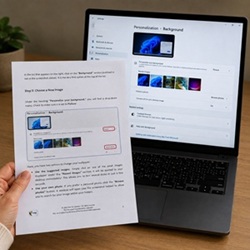
Our printable PC guides for beginners and seniors help you become independent with technology through clear step-by-step instructions, matching screenshots, and explanations without technical jargon.
Printable Step-by-Step Guides for Everyday Digital Skills
Our printable PC guides for beginners and seniors are designed to make learning technology simple. Each guide combines clear step-by-step explanations with matching screenshots, large easy-to-read text, and straightforward instructions so you can learn confidently at your own pace.
Browse Our Printable Guides
Choose the guide that best fits your needs.
All purchases are handled securely through Gumroad, a trusted platform for our PC guides for beginners and seniors.
Secure checkout with credit card & PayPal, followed by an instant PDF download.
🛡️ Protect Yourself: Printable Scam Guide (2026 Edition) — $4.99
A 4-page printable guide to recognize and avoid email, text, and phone scams, before it’s too late. — Read our article on scams.
🌐 Internet for Beginners and Seniors on Windows 11 — $9.99
A 2-tutorial pack to connect your Windows 11 laptop to Wi-Fi and learn how to browse the internet safely and effectively.
🔒 Digital Safety guide: Create a strong password & Master the Cloud — $9.99
A 2-tutorial pack with clear explanations to master passwords, protect personal data, and use cloud storage without technical jargon or complexity.
Read our articles: Why Create a Strong Password — Get started with cloud storage
🖥️ Windows 11 Guide for Beginners – User Accounts & Personalization — $19.99
This 6-tutorial pack helps you create and manage user accounts while customizing the Windows 11 environment for maximum comfort and ease of use.
Read our articles: How to change your wallpaper — How to Create a User Account on Windows 11
🤖 Mastering the use of Artificial Intelligence — $14.99
Understand the core mechanics of artificial intelligence and learn how to effectively integrate it into your daily life and professional workflows.
Read our article on Artificial Intelligence.
🎓 Complete Beginner Pack — $29.99
Everything you need to get started with confidence. This pack brings together all our beginner guides — Windows 11, Internet, and Digital Safety — in one simple, printable collection. Save $10 compared to buying separately.
Why is it advantageous to print these PC guides for beginners and seniors?
Total Peace of Mind for Absolute Beginners
Taking your first steps with technology can feel intimidating. When you’re sitting in front of a computer, it’s completely normal to worry about clicking the wrong button. By printing these PC guides for beginners and seniors, you’ll always have a clear, reassuring reference right beside you.
There’s no need to switch back and forth between multiple windows. By removing that extra complexity, you reduce stress and can focus on learning with confidence. Your printed guide stays exactly where you need it, right next to your keyboard, ready whenever you need it.

Unmatched Reading and Learning Comfort
Many beginners simply prefer learning from paper. Printed in large, easy-to-read text, these PC guides for beginners and seniors can be read even when your computer is turned off. You can take your time, learn at your own pace, and avoid the eye strain that often comes from reading on a screen.
You can also highlight important sections, write your own notes in the margins, or check off each completed step. This hands-on approach makes your progress more visible and helps you remember what you’ve learned.
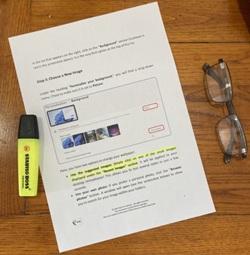
Build Confidence One Step at a Time
With these PC guides for beginners and seniors, you no longer have to worry about making mistakes. Every step includes the matching screenshot, allowing you to compare what you see on your computer with what appears in your guide. You’ll immediately know you’re on the right track, reducing uncertainty and helping you move forward with confidence.
As you complete each step, you’ll gradually become more independent and feel increasingly comfortable using your computer.