
Create a strong password and master cloud storage to protect your personal information online. This practical digital safety guide is designed to help you secure your digital life and manage your data with confidence.
This pack includes two essential step by step tutorials focused on safety and modern storage:
How to Create a Strong Password (8 pages):
Master the absolute foundation of online security. In this first guide, you will discover why a robust defense is crucial to protect your identity, your private emails, and your savings from modern cyber threats.
We will guide you through the process to create a strong password that is impossible for hackers or automated software to guess, but remaining easy for you to remember daily. The tutorial details two practical methods tailored for your comfort: the clever first-letter technique (acronyms) to build secret codes from simple, memorable phrases, and how to safely use the passwords saved in your favorite web browser.
For those who want to go further and simplify their digital life, we also unlock the secrets of the digital vault by showing you exactly how password managers work. Finally, you will learn how to perform a quick and free check-up to monitor your accounts and react instantly if a breach occurs. The main benefit is total peace of mind, knowing your personal data is locked tight.
How to Get Started with Cloud Storage (9 pages):
Now that you have learned how to create a strong password, it is time to upgrade where you store your precious memories and documents. This second guide makes the Cloud incredibly simple and translates every technical term into plain English.
You will learn exactly what cloud storage is and why it is highly beneficial for your daily life, especially for protecting your files against computer crashes, hard drive failures, or accidental loss.
We take you by the hand to set up and use two of the most popular and trusted cloud storage services in the world: Microsoft OneDrive and Google Drive. By the end of this summary, you will know how to automatically back up your important photos, family videos, and administrative papers, keeping them safely accessible from any device—whether you are using your computer, a tablet, or a smartphone.
For improved reading comfort, each guide uses a large 14 point font. The tutorials are provided in PDF format, optimized for printing on 8.5 × 11 Letter paper, with margins designed for easy binding without cutting off any content.
Secure checkout powered by Gumroad
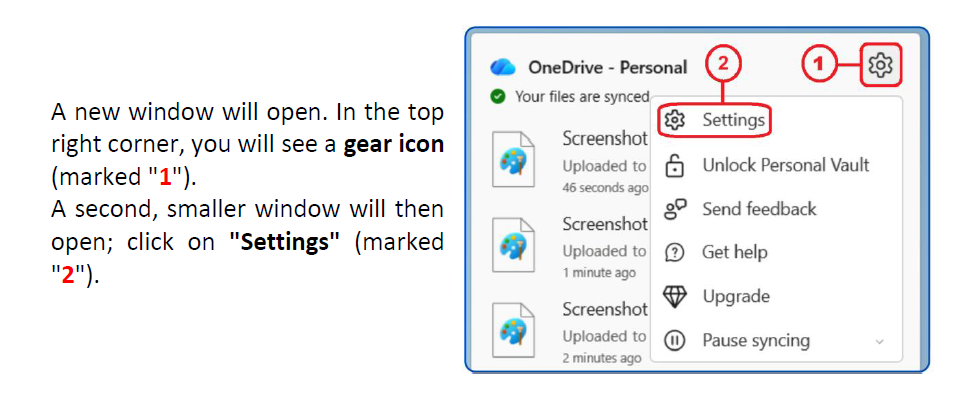
For every action, users are guided by a precise screenshot that matches exactly what they see on their own screen. Each click is explained step by step, ensuring that even complete beginners can follow along easily. This approach removes hesitation and allows you to progress at your own pace.
Here are the two tutorials that make up this Digital Safety theme:
How to Create a Strong Password
Step 1: Choosing a strong password
Step 2: How to remember your passwords safely
Method A:The first-letter technique (Acronyms)
Method B:Passwords saved in your web browser
Method C:The digital vault (Password managers)
Step 3: Monitoring your passwords
A. quick and free check-up
B. “All-in-one” security suites
Summary
How to Get Started with Cloud Storage
Step 1: What Is Cloud Storage?
Step 2: Why Use Cloud Storage?
Step 3: Two Popular Cloud Storage Services
a. Microsoft OneDrive
b. Google Drive
Summary
Secure checkout powered by Gumroad
Looking for even more digital protection?
Safety online goes beyond passwords and storage. If you want to shield yourself from deceptive messages and fraudulent contacts, make sure to check out our comprehensive
4-page guide to fighting scams via email, SMS, and phone calls
This extra resource will give you the practical keys to spot traps instantly and navigate the digital world with total confidence.